Get a Shopify Key
Recommended: Follow Connect Store Instruction for one-click setup — no API key needed! The manual method below is deprecated.
Creating Shopify product pages can take time. Orcai uses AI to automate this process, saving you valuable time.
If you prefer manual setup or the app installation isn’t available, you can connect using a Shopify API key. This key allows Orcai to communicate with Shopify and import product pages.
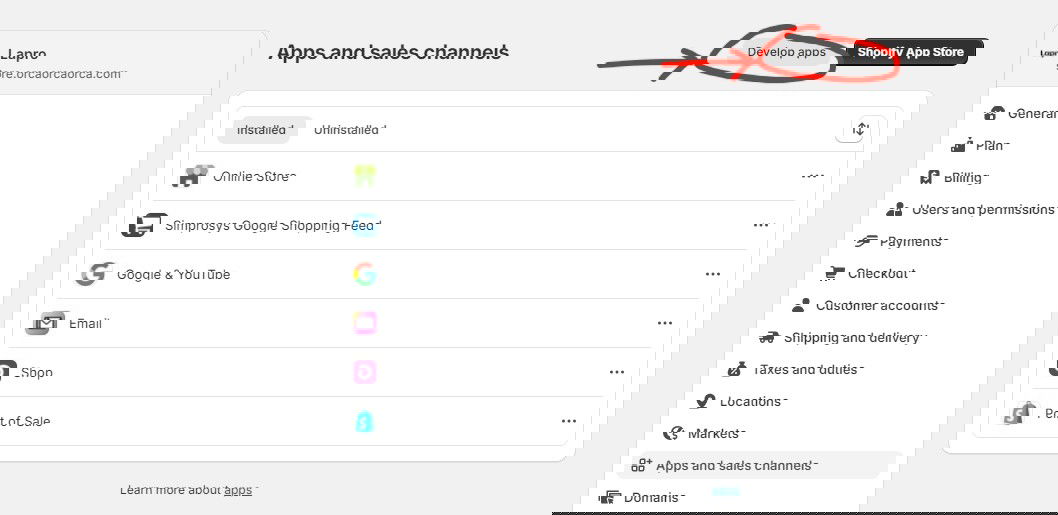
Follow these steps to create your Shopify key:
Open your Shopify store and log in to your admin dashboard.
Click Apps on the left menu.
Select Apps and sales channels.
Click Develop Apps in the top-right corner, then Create App.
Name the app “Orcai” and click Create app.
Click Configure Admin API Scopes.
Select the following scopes and click Save:
write_themesread_themeswrite_theme_codewrite_productsread_productsread_fileswrite_filesread_publicationswrite_publications
Click Install App and confirm the installation.
Go to the Admin API Access Token Panel and click Reveal token once to view your API token.
Copy the token. This is your Shopify key. Save it securely, as it won’t be shown again.
Important: Keep your Shopify key secure. Never share it publicly or commit it to version control.
Next, learn how to connect your Shopify store with Orcai.