Section Product Information
Features
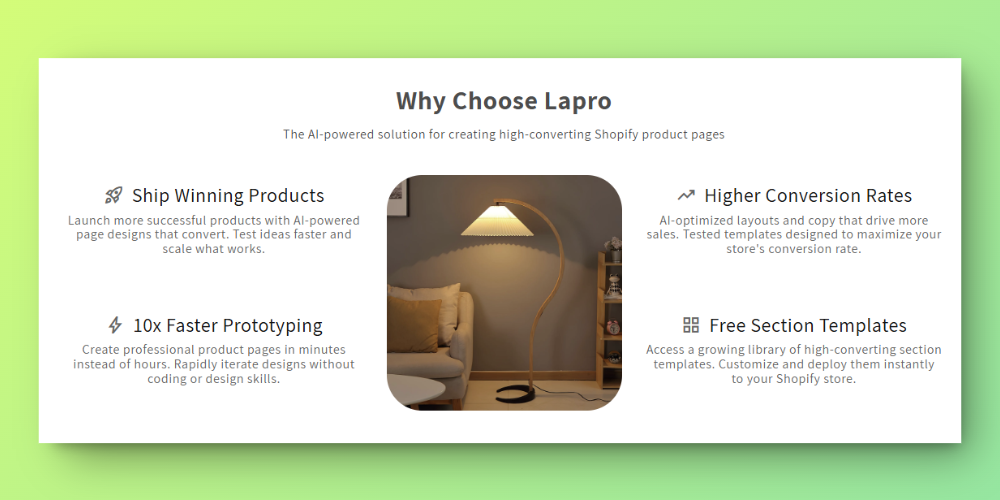
Orcai Features is a no-code Shopify theme section designed to showcase your product’s unique features in a dynamic layout. In this section, a product image is placed centrally while feature blocks are arranged on the left and right sides, highlighting the advantages and key benefits of your product.
Features
- Central Product Image: Upload or change the image to best display your product
- Feature Blocks: Arrange feature highlights on left and right sides
- Section Heading & Description: Add context with a heading and brief description
- Full Customization: Adjust fonts, colors, spacing, and more
How to Add This Section
Install the Orcai App
- Click the “Add to Store Free” button on the Orcai app page.
- Log in to your Shopify account and connect your store with the Orcai app.
- After connecting, click Add and it will show as successfully added.
Add the Section to Your Primary Theme
- In your Shopify admin, go to Online Store > Themes.
- Select your primary theme and click Customize.
Add the Orcai Features Section
- In the theme editor, click Add Section.
- Search for “Orcai Features” and add it to your product template.
- Drag the section to your desired position on the page.
How to Customize
Access the Section Settings
- In the theme editor, click on the Orcai Features section.
Customize the Section
- Central Product Image: Upload or change the image and adjust its size
- Feature Blocks: Configure the feature title, description, and icon for each block
- Section Heading & Description: Update the main heading and description text
- Adjust fonts, colors, and spacing to match your brand’s style
Save Your Changes
- Click Save to update your live store with your customizations.
Key Benefits
- Visual Impact - Central image with surrounding features creates engaging layout
- No coding required - Fully customizable through Shopify’s theme editor
- Mobile responsive - Adapts beautifully to all screen sizes