Import & Edit in Shopify
Edit Product Page in Shopify
After importing your product page, you can make additional edits directly in Shopify. Here are two methods:
Method 1: Editing from the Product Listing Page
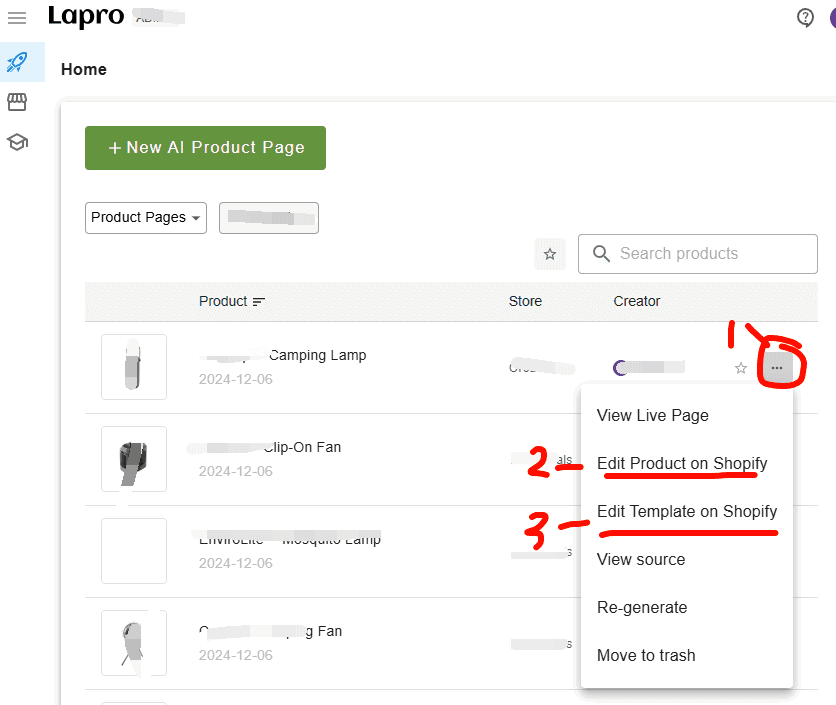
Go to the Orcai product page listing at app.orcai.dev.
Find the product you want to edit in the list.
Click on the three-dot menu button (…) next to the product.
From the dropdown menu, select your editing option:
- Edit Product on Shopify — Edit the product’s title, description, category, price, etc.
- Edit Product Template on Shopify — Edit the product page content like benefits, testimonials, reviews, FAQs.
Method 2: Editing from a Single Product Page
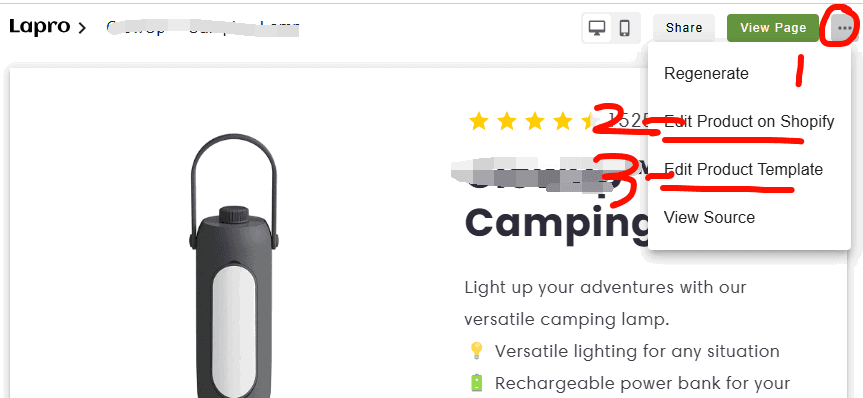
On the single product page in Orcai, click the three-dot menu button in the top right corner.
From the dropdown menu, select your editing option:
- Edit Product on Shopify — Modify the product’s basic information
- Edit Product Template on Shopify — Customize the page layout and content sections
What you can edit in Shopify
Product Settings
- Title and description
- Pricing and inventory
- Images and media
- Variants and options
Template Content
- Section text and images
- Benefits and features
- Testimonials
- FAQ content
- Any other page sections
Tips
- Use Orcai for major page redesigns
- Use Shopify for quick content updates
- Always preview changes before publishing
Need a different theme? See how to request a theme.