Edit Product Page
Styling
Customize the visual appearance of your product page sections with the styling editor.
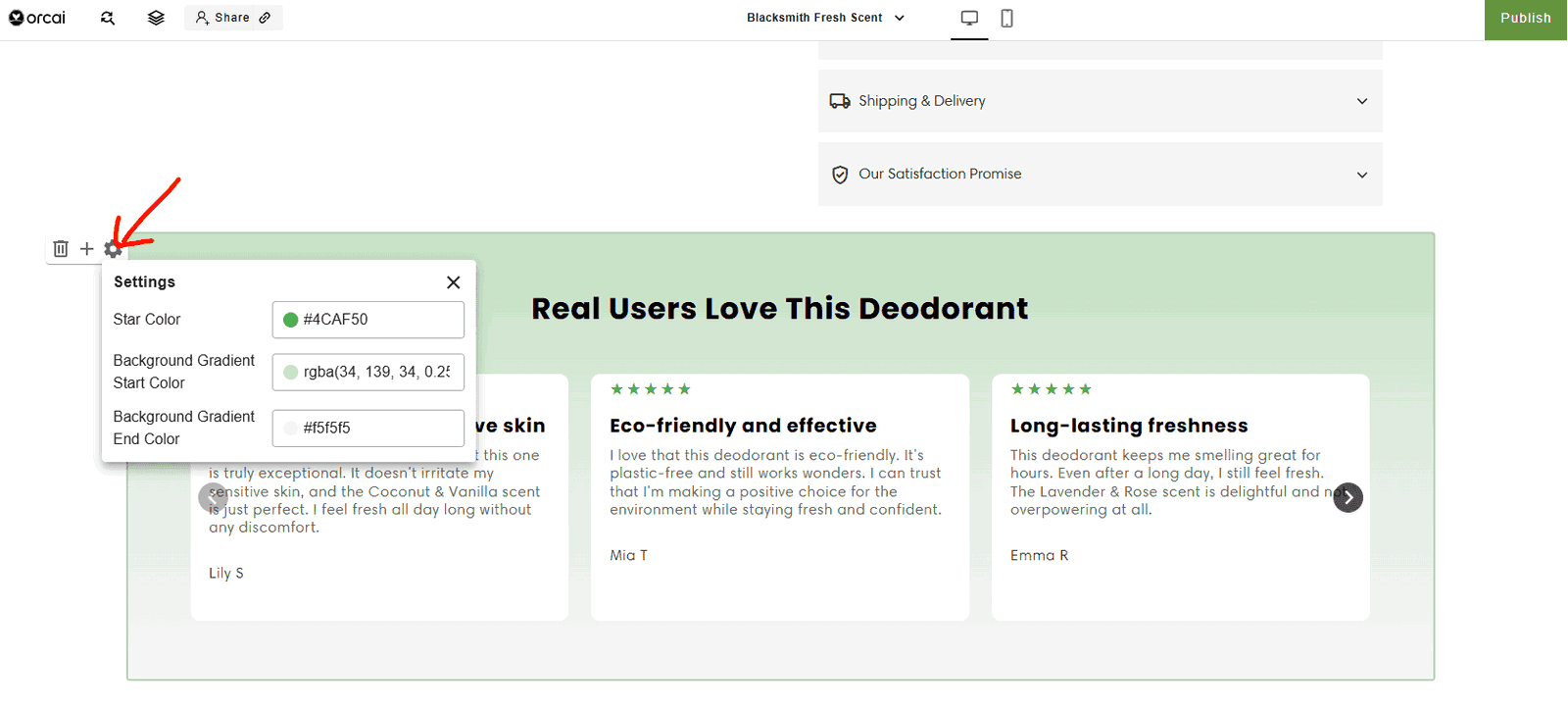
How to access the styling editor:
Visit the product page you want to edit.
Mouse over a section — you will see action buttons appear before the section.
Click on the settings icon (gear) — you will see the styling editor panel.
What you can customize
The styling editor allows you to modify:
- Colors — Background colors, text colors, accent colors
- Typography — Font sizes, weights, and styles
- Spacing — Padding and margins
- Borders — Border styles, colors, and radius
- Layout — Column arrangements and alignments
Styling tips
- Keep your styling consistent with your brand
- Use your brand colors for buttons and accents
- Ensure text has enough contrast for readability
- Test on both desktop and mobile devices
Note: Only a few sections and blocks are supported at this time. We are adding more styling options in the near future.
Want to add reviews? Learn how to add Judge.me reviews.